
The short answer
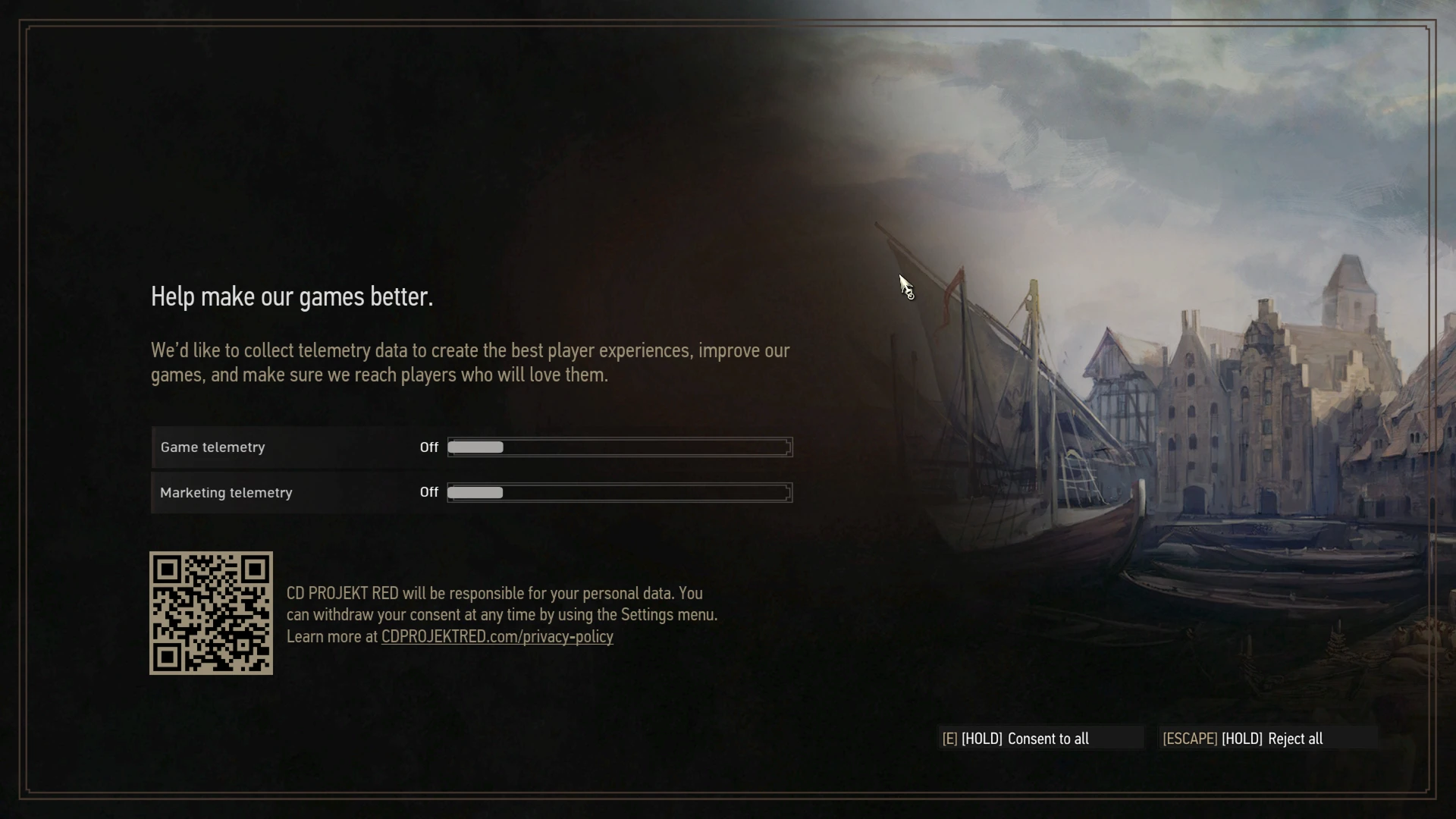
In this test, The Witcher 3 Remastered 5.01 failed at two different startup stages under CrossOver. A compatibility redirect first pointed to a missing DX11 directory. Once that obstacle was bypassed, a graphics pipeline failed in the D3DMetal path. A locally compiled open-source fix by tholtman1-del got the normal Steam launch to the visible first-run telemetry screen.
That is the verified checkpoint. Long gameplay, performance and visual completeness were not tested. The screenshots and build record below come from the actual investigation on 10 October 2026.
I had clicked Play to go monster hunting. Steam apparently understood that as a request to investigate executable paths. A fair misunderstanding. Both activities involve following tracks into places you probably should have brought a torch.
The missing doorway
Steam briefly switched to “Running”, then returned to “Play”. No game window. No useful explanation. This is a broad symptom: a launcher, an unavailable file or an early process failure can all look the same from the library screen.
The first useful move was to establish what was actually installed: the active bottle, the Steam library on the external SSD, the game build and the executable being launched. A folder named “The Witcher 3” does not tell you whether an older troubleshooting guide still applies to its contents.
In this installation the DX12 executable existed in bin/x64_dx12. CrossOver redirected its launch to the older bin/x64 path, which was absent. The request had reached the right house and then followed an outdated sign to a demolished doorway.
Requested:  bin/x64_dx12/witcher3.exe
Redirected: bin/x64/witcher3.exe
Missing:    bin/x64
Workaround: bin/x64 -> x64_dx12
The distinction matters. A DX12 filename does not prove that DX12 initialization has even begun. Here the process never got that far. Adjusting shadows or swapping graphics backends could not make a missing destination appear.
For a similar investigation, this small read-only check is more useful than an afternoon of toggles. Replace the example path with your actual game directory:
TASK_GAME_DIR="/path/to/The Witcher 3"
ls -ld "$TASK_GAME_DIR/bin/x64" \
  "$TASK_GAME_DIR/bin/x64_dx12"
The community installer accommodates the old redirect by adding bin/x64 → x64_dx12. That makes the expected path lead to the existing DX12 build; it does not restore a DX11 renderer. Its filesystem fallback copies the directory on volumes that cannot store the link, so a symlink is not the only possible installed state.
During the investigation, bypassing the executable-name-specific redirect with a renamed test executable also helped isolate this first problem. That was a diagnostic experiment. The retained installation used the community fix’s path workaround and the normal Steam entry.
The reward for resolving the first obstacle was a game window. It was black. The quest designer had clearly budgeted for a second encounter.
The black-screen boss
The first fix opened a window. The second failure lived inside the shader translator.

A visible process and a visible window are different milestones from a rendered interface. The diagnosis now had to move beyond file resolution into graphics startup. The investigation and the community source pointed to a problematic pipeline reaching Apple’s shader-conversion path in D3DMetal.
The community project describes a stream-output pipeline involving a geometry shader and no pixel shader. Its proxy intercepts the relevant graphics-pipeline creation call and rejects that troublesome case before the translator attempts it.
Here is the decision point from the source revision used for the local build. gs and ps describe geometry- and pixel-shader bytecode; soEntries counts stream-output declarations. These names belong to the surrounding source, so this is an excerpt rather than a standalone program.
if (gs->n && (soEntries || !ps->n)) {
    logmsg("  -> #%ld SKIPPED (stream output / GS without PS)", id);
    if (out) *out = NULL;
    return (long)0x80070057; /* E_INVALIDARG */
}
long hr = origGfx(dev, desc, riid, out);Two failures, two layers
- Steambin/x64_dx12/witcher3.exe
- Stale CrossOver redirectbin/x64/witcher3.exe
- Destination missingLaunch ends before the game window
- Symlink reaches the DX12 buildx64 → x64_dx12
Correcting the path opened a window. It also revealed the next failure.
- The Witcher 3Direct3D 12
- FidelityFX proxyamd_fidelityfx_loader_dx12.dll
- D3D12 pipeline callCreateGraphicsPipelineState
E_INVALIDARG · 0x80070057
The proxy skips the problematic path. This is a workaround that may omit a visual effect.
The condition returns E_INVALIDARG for the intercepted case. Other graphics-pipeline calls continue through the original function. In Microsoft’s D3D12 API, pipeline creation returns an HRESULT; the proxy changes the answer to one request rather than implementing a new renderer.
The DLL also forwards the FidelityFX entry points to the preserved original loader. That combination gives it a useful position in the startup chain: it can observe and adjust the troublesome call while retaining the underlying library.
This is an application-specific workaround. The source’s layout assumptions and device hooks are tied to the environment it was written for. A successful startup can come with a missing visual effect. The presence of “FidelityFX” in the filename also says nothing by itself about whether upscaling or frame generation has been validated.
Forge a Windows DLL on a Mac
The next step was a surprisingly small crafting recipe: one C source file, a Windows target and a compiler running on macOS. No Windows desktop was needed for this build.
Zig supports cross-compilation. The recorded target was x86_64-windows-gnu: the output had to fit the Windows x86-64 process inside CrossOver, even though the host Mac used Apple Silicon. Host architecture and output architecture are separate decisions.
For the historical build, I used community commit 436de811fcc8784dd0dfb6c9666077b34ca53d31 and the recorded ziglang version 0.17.0. The sequence below makes those inputs explicit. It builds the DLL; it does not install it into a game.
git clone https://github.com/tholtman1-del/witcher3-crossover-fix.git
cd witcher3-crossover-fix
git checkout 436de811fcc8784dd0dfb6c9666077b34ca53d31

python3 -m venv .venv
.venv/bin/python -m pip install ziglang==0.17.0
.venv/bin/python -m ziglang cc \
  -target x86_64-windows-gnu \
  -shared -O2 \
  -o amd_fidelityfx_loader_dx12.dll \
  ffxproxy.c

shasum -a 256 amd_fidelityfx_loader_dx12.dll-target selects the Windows output platform, -shared produces a DLL and -O2 enables optimization. The final command records a SHA-256 fingerprint. My local artifact’s hash is in the downloadable build record.
A hash identifies particular bytes. It does not establish that a binary is trustworthy, and a different compiler environment can produce a different hash from the same source. Keeping the source revision, compiler, output target and test outcome together makes the build easier to examine later.
Install with an address, keep a way home
The Steam library was on an external drive, and the active bottle was not the first directory a default-path guess suggested. Passing the verified game folder directly avoided searching an entire collection of bottles and volumes.
After closing the game, the project’s installer replaced the loader with the proxy, preserved the original under amd_fidelityfx_loader_dx12_orig.dll and applied the path workaround:
TASK_GAME_DIR="/path/to/The Witcher 3"
zsh ./install.command "$TASK_GAME_DIR"Those commands assume the source checkout and the freshly built DLL are together, with the game directory substituted for the example. The backup was checked against the original. The retained installation then returned to the ordinary Steam launch, which was the workflow we wanted to repair.
To undo the workaround later, close the game and run the companion uninstaller from the same source checkout:
TASK_GAME_DIR="/path/to/The Witcher 3"
zsh ./uninstall.command "$TASK_GAME_DIR"Updates can respawn the encounter
A game update or Steam’s file verification can replace the proxy with the shipped loader. If the same symptom returns, check the installed state and whether the fix still matches the new build before reapplying it. A repair that was appropriate on 10 October is not automatically appropriate after the next patch.
That is why the build record is part of the article. Future-me should get a map, not a note saying “I changed something in this folder and it worked once”.
Checkpoint reached. Campaign still untested.
What the test proves
- Normal Steam launch
- Passed
- Rendered game interface
- Passed
- Original DLL preserved
- Passed
- Long gameplay session
- Not tested
The honest quest reward: a working startup path, a preserved original DLL, and a reversible install.
The normal launch reached a rendered game interface. The recorded proxy test also reports that pipeline #15 was skipped and later pipelines were created. The original loader was preserved and its backup matched the original.
There was no long gameplay test, no FPS benchmark and no assessment of every visual effect. “We reached the checkpoint” is an accurate result. “The entire campaign is flawless” would require another adventure.
What I would carry into the next debugging quest
Start by locating the failing stage. A return to “Play”, a black window and a broken scene are three observations with potentially different causes. Preserve the setup details, change one part of the chain and check which milestone moved. When a new error appears after a fix, it may mean the first blocker was removed.
This lesson travels well beyond games. A web app can have a resolved route and still fail while loading data. A service can start and still be unable to talk to its database. A compiler can finish and still produce an artifact that fails its first real workload. The useful question is always: what did this test actually establish?
The playful side of interfaces is something I also explored in Terrarium Studio’s browser-based 3D planner. This time, the side quest arrived without asking. Its most valuable loot was a clearer model of the system.
Questions from the notice board
Why does Witcher 3 briefly run in Steam, then switch back to Play?
In this recorded setup, CrossOver redirected the launch to a missing bin/x64 directory. That explains this instance of the symptom. Other installations can fail for different reasons, so verify the launch target and game version before applying the same workaround.
Why did fixing the launch path still leave a black screen?
The executable could finally start, revealing a second failure in graphics initialization. The community proxy rejected the problematic pipeline call. The two obstacles happened in sequence and needed separate diagnosis.
Can I just select DX11 instead?
The older DX11 executable was absent from the tested Remastered installation. Redirecting its directory to the existing DX12 build does not turn that build into DX11. Advice written for earlier editions can therefore be misleading here.
Why can an update undo the fix?
Steam verification and game updates can restore the original loader DLL. Recheck the game build and current community instructions before reinstalling the workaround. Keep the original-file backup and a record of what was changed.
Does this prove the game runs perfectly on an M1 Max?
No. It proves the normal Steam launch reached the first-run telemetry screen on the recorded setup. Long gameplay, performance, upscaling, ray tracing and visual completeness were not tested in this session.
Who wrote the fix, and can I inspect the source?
tholtman1-del published the fix under the MIT license. The source links in this article point to the specific revision used in the local build. Our contribution is the diagnosis, local compilation, verification and documented handoff.
Sources, credits and the paper trail
- Community project and current instructions — tholtman1-del.
- Source revision used for the build — commit pinned for this case study.
- Download the sanitized build record — versions, compiler, artifact hash, recorded changes and validation.
- MIT license for the source excerpts.
- D3D12 pipeline-creation API and Zig cross-compilation.
Other adventurers at the same doorway
The community has been following similar tracks. These Reddit discussions are useful companion reading, with their own hardware, game versions and test conditions:
- Witcher 3 Remastered on Apple Silicon with Sikarugir — a Wine/D3DMetal report describing a missing launch path followed by the black-screen failure, using the same community project. Its installation steps belong to Sikarugir rather than our CrossOver bottle.
- The Witcher 3 Remastered not starting — reports from other Mac users, including a CrossOver 26.2 setup and a black-screen crash.
- M1 Pro, CrossOver 26.1 and D3DMetal — a separate user’s setup and settings discussion. It is useful context for a later gameplay test, not a benchmark of the machine in this article.
Screenshots were captured during the local test on 10 October 2026. Game imagery belongs to CD PROJEKT RED. This article documents an independent community workaround; it is not an official patch or a claim of affiliation. The cover is an editorial illustration; the technical figures are real captures and diagrams drawn in HTML/CSS.
