
A caller presses two for support and reaches the wrong team. The recording has excellent diction. There is now a very well-pronounced problem.
A useful business phone announcement gives someone a clear next step. That means thinking about the words, the voice and what the phone system actually does after the recording finishes. A welcome greeting, an on-hold message and an after-hours notice are pieces of the same conversation.
That is the idea behind phon.ist: create AI phone announcements in the browser, listen before ordering, and bring related messages into a visible call flow. It is a service from adam medien, connected to the work around telefonansagen.de. Here on TOSA, I want to show both the practical workflow and the product design decisions that make it understandable.
What phon.ist does
phon.ist combines an announcement generator, a studio for several announcements and a visual Call Flow Designer. Businesses can prepare greetings, voicemail messages, on-hold announcements, absence notices and IVR menu prompts. IVR is the familiar keypad menu: press one for one team, two for another.
Each workspace starts at a different scale:
| Workspace | Useful when | What you work on |
|---|---|---|
| Generator | You need one announcement | Your script, AI voice, optional music and audio preview |
| Studio | Several announcements belong together | A shared project with related scripts, voice, music and language versions |
| Call Flow Designer | You need to understand the caller’s route | Announcements, opening hours, keypad choices, waiting and transfer paths |
The Call Flow Studio overview explains the relationship. The plan and audio are then used when configuring the actual phone system. Numbers, schedules and transfers are set up there, usually with the business’s administrator or telephony partner.
Create an AI phone announcement in four steps
The English announcement generator opens without requiring an account. You can start with your own text or a template for a greeting, after-hours message, voicemail, holiday notice or on-hold announcement.
- Write the next step. Say who the caller has reached and what will happen. For an absence message, explain when or how someone can respond.
- Choose a voice and optional music. Listen to the voice examples, then choose a sound that suits the business. Speech on its own is also a complete choice.
- Create and check your own preview. Listen for company names, numbers, pauses and unfamiliar terms. Readable text can still sound awkward aloud.
- Review the current version and order. Check the script and selected options together. The finished production is purchased separately from the free preview.
Here is an illustrative greeting for a fictional business:
Thank you for calling Cedar Workshop. For an existing appointment, press one. For a new enquiry, press two.
The corresponding phone menu needs those two routes. If every caller goes to the same person, a short greeting may be enough. A keypad menu earns its place by helping someone get somewhere.
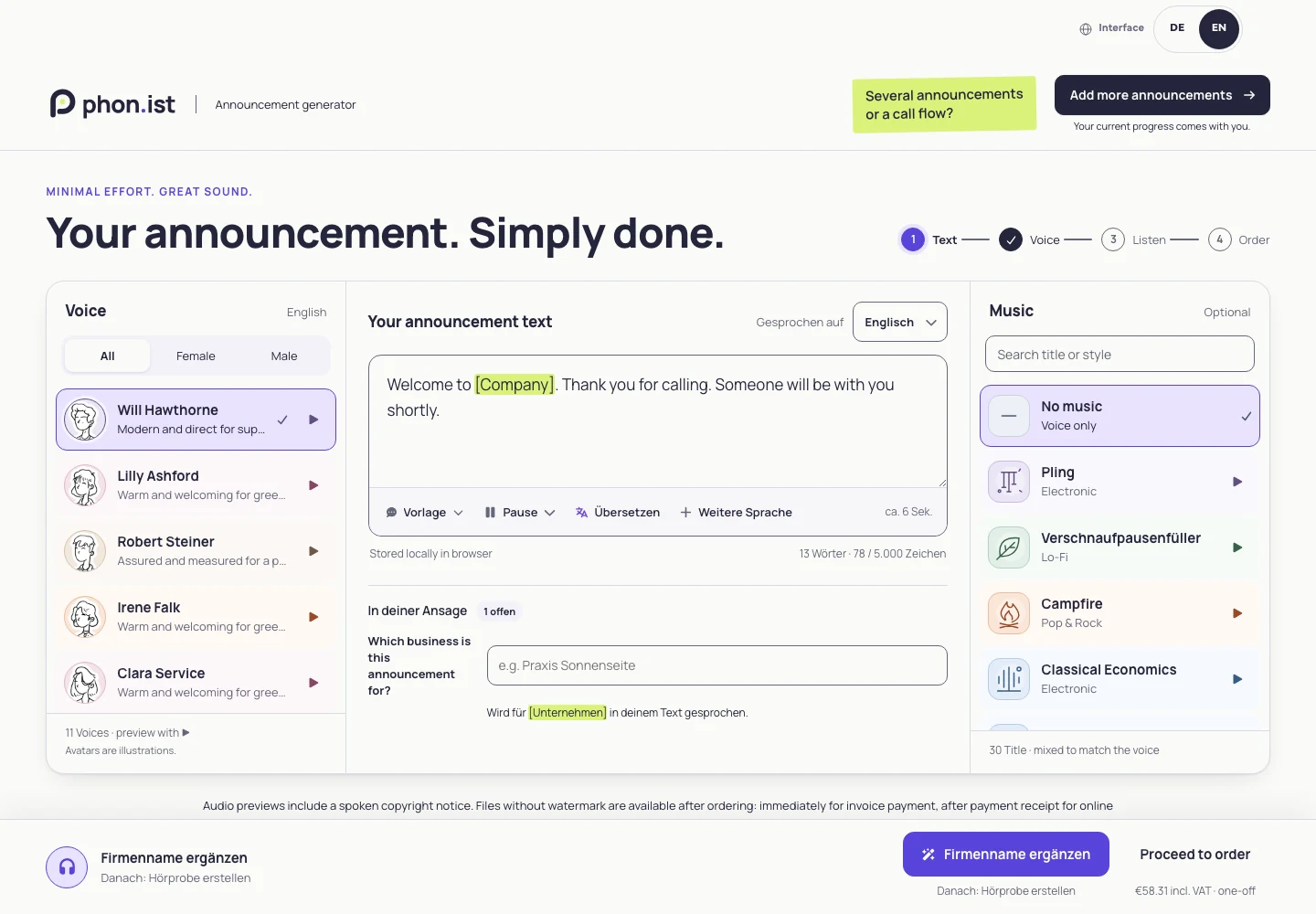
The generator also shows the draft’s save status and offers ways to resume through a link or email. Before leaving, check the status shown for your current draft. A browser-saved draft and a link you can open on another device serve different purposes.
A preview should belong to the text you are looking at
One of the more interesting development problems appears after the first successful preview. Someone changes a company name. Or switches the voice. The player still has an audio file, but that file now represents an earlier choice.
The generator marks an outdated preview and asks for a new one. Ordering requires a current preview. This makes the connection between the editable text and the audio visible at the moment it matters.
For developers, a small model captures the basic idea:
type AudioInput = {
  text: string;
  voiceId: string;
  musicId: string | null;
  language: string;
};

const inputKey = (input: AudioInput) => JSON.stringify([
  input.text,
  input.voiceId,
  input.musicId,
  input.language,
]);

const previewIsCurrent = (
  draft: AudioInput,
  preview: { inputKey: string } | null,
) => preview?.inputKey === inputKey(draft);
This is an illustrative state model, not an excerpt from the production implementation. A real render can depend on more settings. The rule is useful beyond audio: a preview needs an identity that reflects the inputs that produced it. The interface can then explain when the person is hearing an earlier version.
In a React interface, the editable draft and the generated audio need to be treated as related states. The same care applies to saving and switching workspaces. The product should say where the draft is stored and what carries over when a single announcement becomes a larger project. Those states are part of the workflow people need to understand.
Plan the call flow around the announcements
Once several messages are involved, a list of files becomes difficult to discuss. The Call Flow Designer shows how the pieces connect. Its public demo lets you start from a template, change text, extend the flow and walk through a simulated call.
For a small service team, the planning questions might look like this:
| Point in the call | Question to settle |
|---|---|
| Opening hours | Which route applies when the office is closed or on holiday? |
| Greeting and keypad menu | Which option leads to which team? |
| Transfer | What happens when the destination is busy or nobody answers? |
| Waiting | What does the caller hear while waiting, and where does a timeout lead? |
| Voicemail or ending | What information should the caller leave, or what closes the call? |
These questions benefit from a shared view. A receptionist can check the wording, a manager can confirm responsibilities and a telephony partner can see the intended routing.
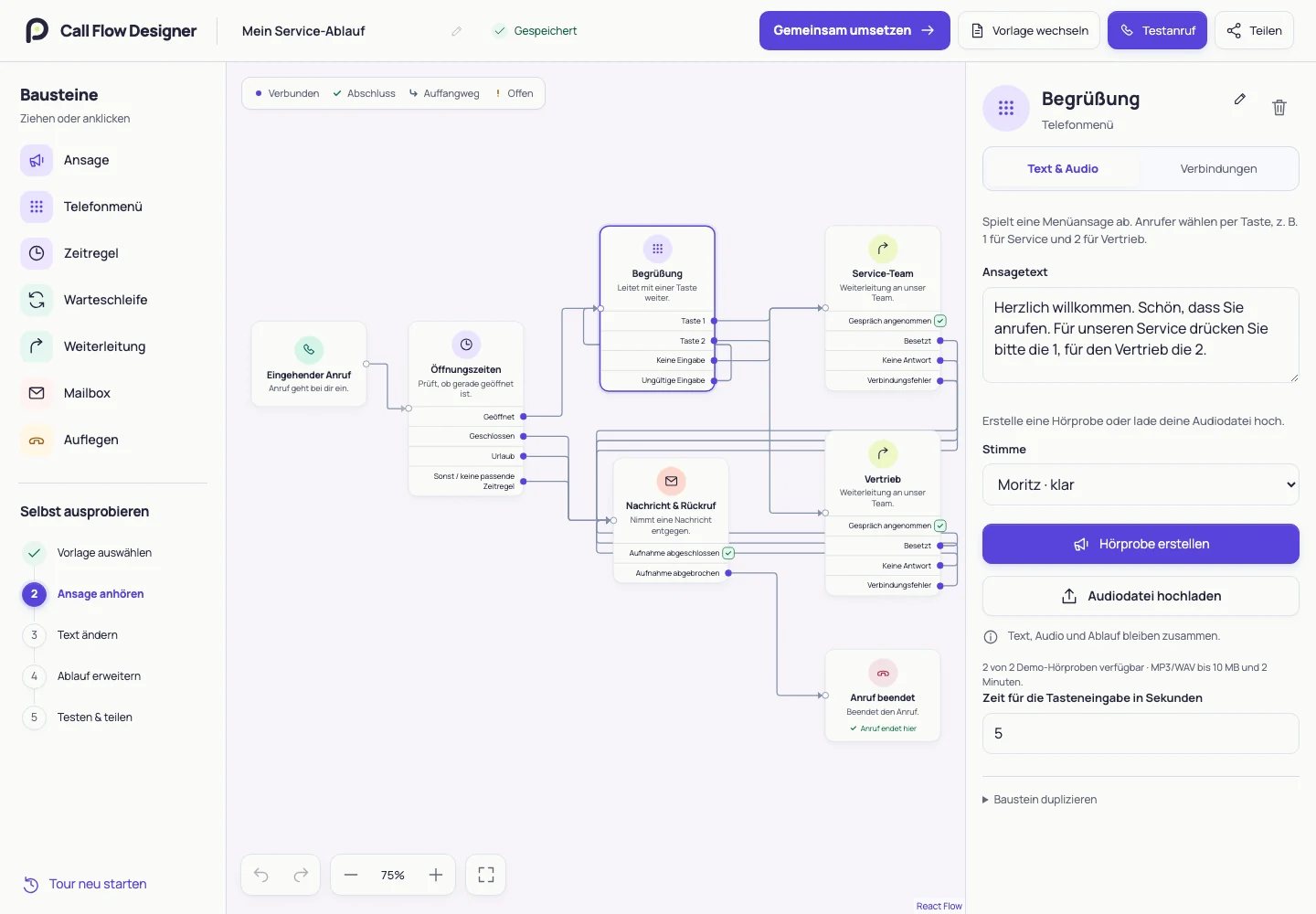
The developer-facing detail here is the shape of the connections. A transfer has several possible outcomes: answered, busy, no answer or an error. A menu also needs a route for silence and an invalid key. Making those outcomes visible gives a team concrete things to review. The happy path rarely objects; the fallback path deserves a chair at the meeting.
Multilingual announcements: interface and voice language
The language you use to operate the app and the language a caller hears are separate decisions. The current generator supports German and English as spoken primary languages. The studio adds French and Italian versions to a project. Voice choices can differ between languages.
The English language and voice information is the right place to check the current selection. The English website also offers Dutch, Danish, Swedish and Finnish productions through a conversation with the team; those should be confirmed for scope, suitable voice and price before ordering.
For any language version, review the actual script. A company name, a room number and an opening time all need to make sense when spoken. Keep the purpose of the announcement consistent while giving each language its own wording and rhythm.
From audio file to a working phone system
Before importing a recording, check the requirements of the target system: file format, codec, sample rate, channel count, maximum size and duration. A file extension alone does not describe every relevant property. phon.ist’s audio-format guide, currently in German, covers this handover.
Then make an external test call to the actual number. Try each menu option, no input, an unavailable destination and the after-hours route. Check that the announced action happens and that speech remains understandable through the phone connection. The Designer’s simulation and the real call answer different questions.
The help section also separates the jobs clearly: phon.ist helps prepare the announcements and plan the flow; your phone system carries out the routing. Keep that distinction in the handover to the person configuring it.
Cost, free previews and common questions
Can I create a phone announcement for free?
You can start without signing up and create a free preview. Previews include a protective notice. The finished production is a separate purchase. In a studio project with several announcements, one designated full preview is initially available; further announcements are unlocked after commissioning.
What does a finished announcement cost?
At the time of checking, the Starter package is €49 net, as a one-time purchase, plus VAT. Larger packages, additional languages and selected options affect the scope and price. Check the current package details and the order summary for the version you need.
Are the voices AI-generated?
Yes. The generator’s voices and voice examples are synthetic. The separate telefonansagen.de project covers individually produced announcements with human voice talent and personal consultation. Choose the production approach that fits the script, pronunciation requirements and amount of collaboration you need.
Why this belongs in the workshop
phon.ist brings content, audio and routing into a workflow that a business can review. That is what interests me about its development: a clear save status, a current preview and a visible fallback route can each remove a different source of uncertainty.
The same relationship between technical rules and how an interface feels runs through Engineering Emotion: Design Systems for Developers. The phon.ist project page gives the shorter overview; the product itself is the best place to hear the voices and work through your own text.
Create an English announcement → · Explore the Call Flow Studio →
Product information and screenshots checked on 20 October 2026. The cover uses the existing phon.ist brand illustration; interface figures are real captures of the public generator and Designer demo. The code example illustrates a design principle.
