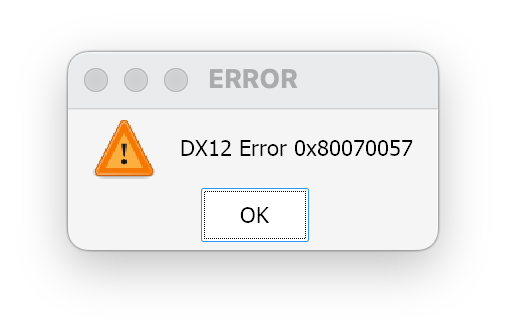
I wanted a pirate adventure. CrossOver offered an error dialog. No tropical island, no dramatic boarding manoeuvre. Just DX12 Error 0x80070057, which is a remarkably dry way to begin a sea voyage.
The useful result: Assassin’s Creed Black Flag Resynced reached the menu and a short gameplay test with correct graphics on this M1 Max, using CrossOver 26.3 with a separately installed GPTK 4 Beta 3 runtime, D3DMetal selected and MetalFX disabled. The original CrossOver app stayed untouched. No FPS figure or long-session stability result was measured.
This is the October 31, 2026 test of Resynced, the remake of Assassin’s Creed IV: Black Flag. An old AC4 guide for the 2013 game describes a different target. Here is the route we actually took, including the screenshot that briefly sent us in the wrong direction.
The starting point: a reproducible DX12 error
The machine was an Apple M1 Max running macOS 26.6.2, build 25G83. The installed CrossOver was 26.3.0.39832, with its bundled D3DMetal 3.0. The game lived in an existing bottle on an external SSD.
That baseline stopped at DX12 Error 0x80070057. Recording the exact message matters more than filing it under “CrossOver crash”. A game that refuses graphics-device creation, a process that hangs and a game that renders incorrectly can all look like “it won’t start” from the sofa. They need different evidence.
CodeWeavers documents D3DMetal as CrossOver’s graphics translation option for DirectX 11 and 12. That made the renderer/runtime boundary a useful next place to investigate. It did not make every DirectX toggle a promising fix.
Give the experiment its own ship
We created a separate CrossOver 26.3 app copy and installed Apple’s Game Porting Toolkit 4 Beta 3 evaluation runtime there, following the Read Me supplied with that download. The stock /Applications/CrossOver.app retained D3DMetal 3.0. The experimental app had its own name and explicit launcher path.
There is an important boundary here: a separate application is not a separate bottle. Both app copies used the existing bottle, game files, settings and saves. Starting the game could still change those files. We preserved bottle configuration, the game configuration after the failed baseline and an existing autosave before proceeding.
For a repeatable comparison, quit all applications in the target bottle before changing runtimes. Avoid two different Wine runtimes using that bottle at once. A dedicated test bottle gives stronger isolation, but it was not what this particular experiment used.
Apple provides the evaluation environment for checking Windows-game compatibility on Apple silicon. Obtain the runtime from Apple and follow the instructions for the exact build you download. This article supplies neither Apple binaries nor a replacement runtime installer.
The configuration that reached gameplay
The working launch profile used these three settings:
CX_GRAPHICS_BACKEND=d3dmetal
D3DM_ENABLE_METALFX=0
ROSETTA_ADVERTISE_AVX=1
The first explicitly selected D3DMetal. The second left MetalFX off. The third enabled the AVX advertisement used in this launch profile. These are the settings of the successful combination; we did not separately test removing each one. The comparison therefore supports this configuration, not the claim that one environment variable alone fixes the game.
We also checked which D3DMetal framework and D3D12 files the running game actually loaded. An app icon, an installation folder and a backend toggle tell you what you intended to run. Loaded-library paths tell you which runtime the process reached.
For your own diagnosis, this read-only check can help after you have identified the correct game PID:
# Replace 12345 with the running game's process ID.
lsof -p 12345 | rg 'D3DMetal\.framework|apple_gptk/.*/d3d12'
Check the full paths against the intended app copy. No match is inconclusive: process permissions, naming and a process that has already exited can affect the output. It is not a verdict on game compatibility.
The black screen that belonged to the capture
With the new runtime, the previous DX12 dialog disappeared. A capture of just the Wine game window was black. A very tempting conclusion: excellent, we have upgraded from one broken thing to another.
But the person at the screen could see the intro or menu. A full-display capture then showed the menu correctly, including its animated 3D character. The capture method had failed to show the rendered scene; that black image was not evidence that the game itself was rendering black.
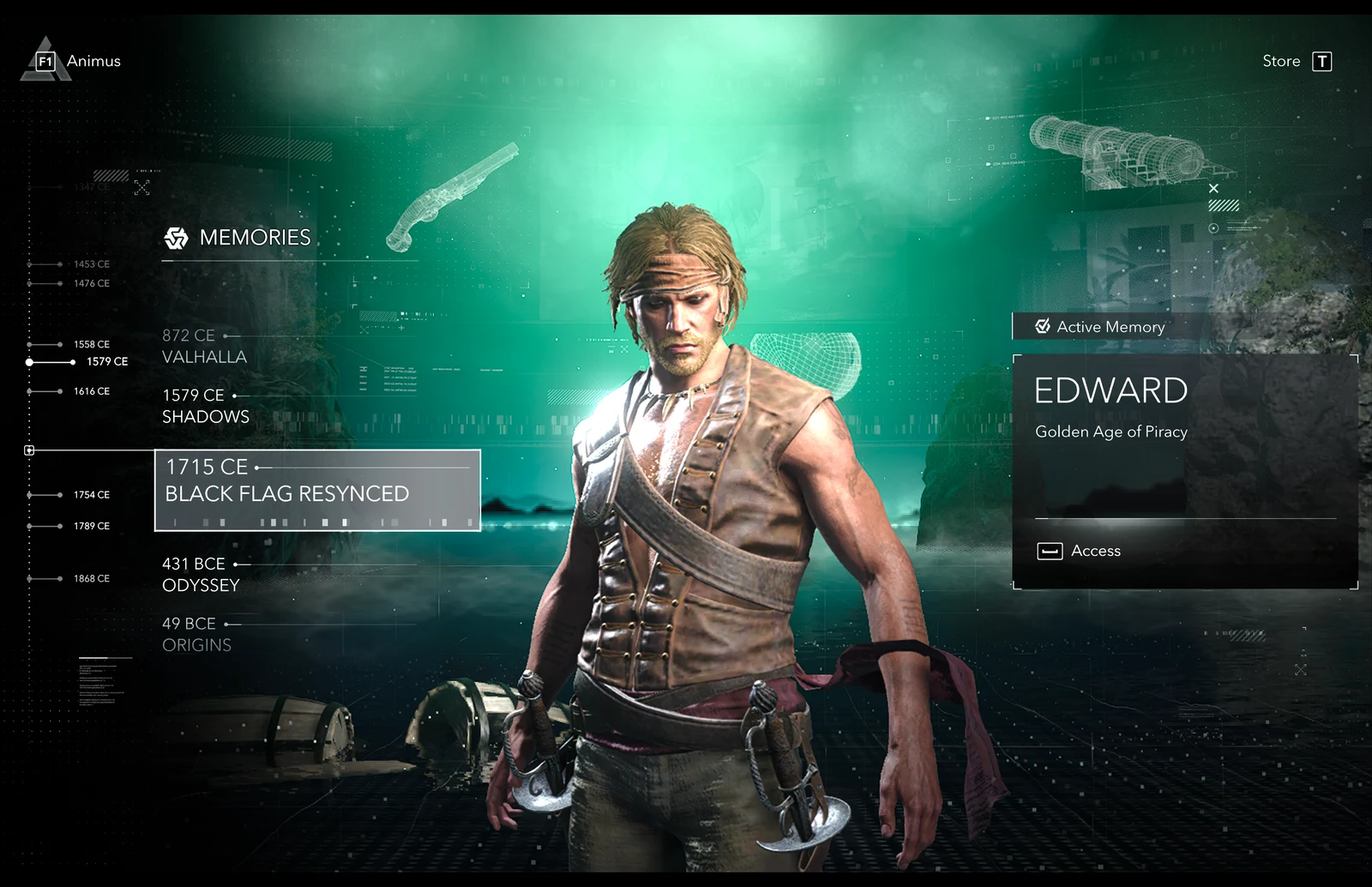
The logs also contained AGX: exceeded compiled variants footprint limit while menus were visible. That line deserves context, not instant promotion to root cause. It did not, by itself, prove a crash in this run. The same discipline helped in the earlier Witcher 3 CrossOver investigation: follow the failure you can demonstrate.
A launcher that remembers the route
Once a configuration works, make it easy to launch that exact configuration again. Opening the ordinary CrossOver app would silently return us to the stock runtime.
This is a portable adaptation of our tested launcher, with example paths and a bottle named BlackFlag. Change the bottle root, bottle name and game directory to your installation. The runtime must already be assembled; these flags do not install GPTK. Use the game executable only where direct launching is supported by your installation, and complete any required store authentication normally.
#!/bin/zsh
set -eu

runtime="$HOME/Applications/CrossOver-BlackFlag-Test.app/Contents/SharedSupport/CrossOver"
bottle_root="$HOME/Library/Application Support/CrossOver/Bottles"
bottle='BlackFlag'
game_dir="$bottle_root/$bottle/drive_c/Games/BlackFlagResynced"
log_dir="$HOME/Library/Logs/BlackFlag-CrossOver"

[[ -x "$runtime/bin/wine" && -f "$game_dir/ACBlackFlag.exe" ]] || {
  print 'Runtime or game missing. Check the paths first.'
  exit 1
}

mkdir -p "$log_dir"
log_file="$log_dir/$(date +%Y%m%d-%H%M%S).log"

CX_BOTTLE_PATH="$bottle_root" "$runtime/bin/wine" \
  --bottle "$bottle" \
  --env 'CX_GRAPHICS_BACKEND=d3dmetal D3DM_ENABLE_METALFX=0 ROSETTA_ADVERTISE_AVX=1' \
  --debugmsg '-all' \
  --workdir "$game_dir" "$game_dir/ACBlackFlag.exe" \
  >"$log_file" 2>&1
The actual test used an external SSD and an existing bottle named Mac. That difference is precisely why a public snippet should expose its paths rather than assume every reader has my folder layout. Quit an already running game before using the launcher. Reduced Wine logging is convenient for normal starts; an empty or short log still does not prove that the game worked.
A tempting patch we left ashore
An older community byte patch targeted GPTK 4 Beta 2. Its expected search pattern did not match the Beta 3 library. We did not apply it.
Binary offsets and byte patterns are properties of a particular build. A failed pattern check is a reason to stop and inspect, not to remove the check until the script writes something. In this test, the Beta 3 configuration reached gameplay without that older patch. We cannot infer what the patch would have done on its intended build.
We also did not install or test a MetalFX/DLSS bridge. Keeping D3DM_ENABLE_METALFX=0 was part of the tested profile. Performance tuning can be a separate expedition once the known working route is documented.
What the test does and does not prove
| Check | Result on October 31, 2026 |
|---|---|
| CrossOver 26.3 with bundled D3DMetal 3.0 | DX12 error at launch. |
| Separate CrossOver 26.3 app with GPTK 4 Beta 3 | Setup and menu rendered; no startup crash during the observation of more than six minutes. |
| Short gameplay | Player confirmed the game ran with correct graphics. |
| FPS, frame times and a long session | Not measured. |
| MetalFX/DLSS bridge | Not installed or tested. |
| Other Macs, game updates and runtime builds | Not covered by this test. |
The game build number was not recorded, so this is a dated local result, not a compatibility guarantee for every update. The test supports a working startup and a short play session on this machine. It does not support “60 FPS”, “fully stable” or “works on every Apple silicon Mac”. The sea is quite capable of producing a second surprise.
If you hit the same DX12 error
Record the exact game edition, macOS version, CrossOver build and selected backend first. Preserve the relevant bottle configuration and saves. Then compare a known baseline with one clearly identified test setup, verify the loaded libraries and check the screen independently of a single capture method.
If the experiment fails, close every application in the bottle before returning to the stock CrossOver app. That restores the original runtime choice; it does not undo settings or save changes inside a shared bottle. Restore only the specific backed-up files you need.
For this voyage, the satisfying ending was a rather ordinary one: a visible menu, a confirmed short play session and a launcher that knows which runtime to use. The pirate ship finally left the harbour. Its departure paperwork just happened to be a shell script.
Sources and related notes
- Apple: Game Porting Toolkit and the evaluation environment — official runtime source; the local test used the Beta 3 download and its bundled instructions.
- CodeWeavers: CrossOver 26 advanced graphics settings — backend definitions and settings scope.
- Ubisoft: Assassin’s Creed Black Flag Resynced — identifies the remake discussed here.
- The Witcher 3 and the two-bug side quest — another case where the useful fix followed a specific diagnosis.
The results, screenshots and launch profile above come from our own October 31 test. The cover is an editorial illustration; the two diagnostic images are actual captures.
